

What Gets Synced
Connect a ticketing integration and its tickets sync into Decimal automatically. Updates come through the same way: when a customer replies, a teammate comments, or the status changes, it shows up on the ticket in Decimal.Webhooks
Some ticketing tools can notify Decimal the moment something changes, so tickets and replies show up sooner. Webhook support is per integration. Plain and Pylon integrations both have it, and their pages walk through the setup. If you’d like it for a different ticketing tool, ask us.Import Ticket
Need a specific ticket now, whether it predates the integration or a filter kept it out? Admins can pull it in by ID.-
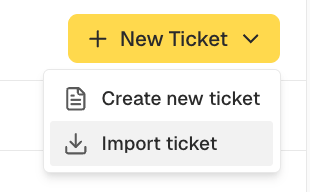
On Support, open the dropdown beside New Ticket and choose Import ticket.
- Pick the Provider. Only the ones you have connected appear.
- Enter the ID the ticket has in that tool in the Ticket field.
- Click Import Ticket. It appears in Decimal once syncing finishes.
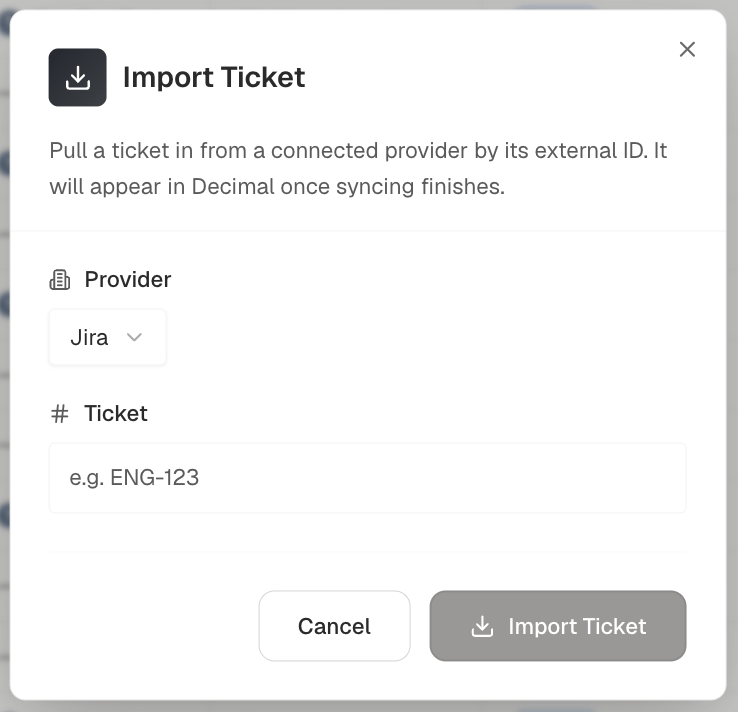
Import is available for these three providers today. An ID that doesn’t match a ticket returns an error.
Need to bring in a batch? Get in touch and we can talk through the options.
Why a Ticket Didn’t Sync
Three things to check, in this order.- Open the integration under Settings → Integrations. An amber notice means the connection broke, and nothing new syncs until it is reconnected.
- Check its filters. Most ticketing integrations let you limit which projects or groups sync, and exclude tickets matching a rule. A ticket caught by one of those never arrives.
- Check when the ticket was created. Decimal syncs recent activity, so anything from before you connected the integration needs importing: one ticket you can pull in yourself, a batch we run for you.