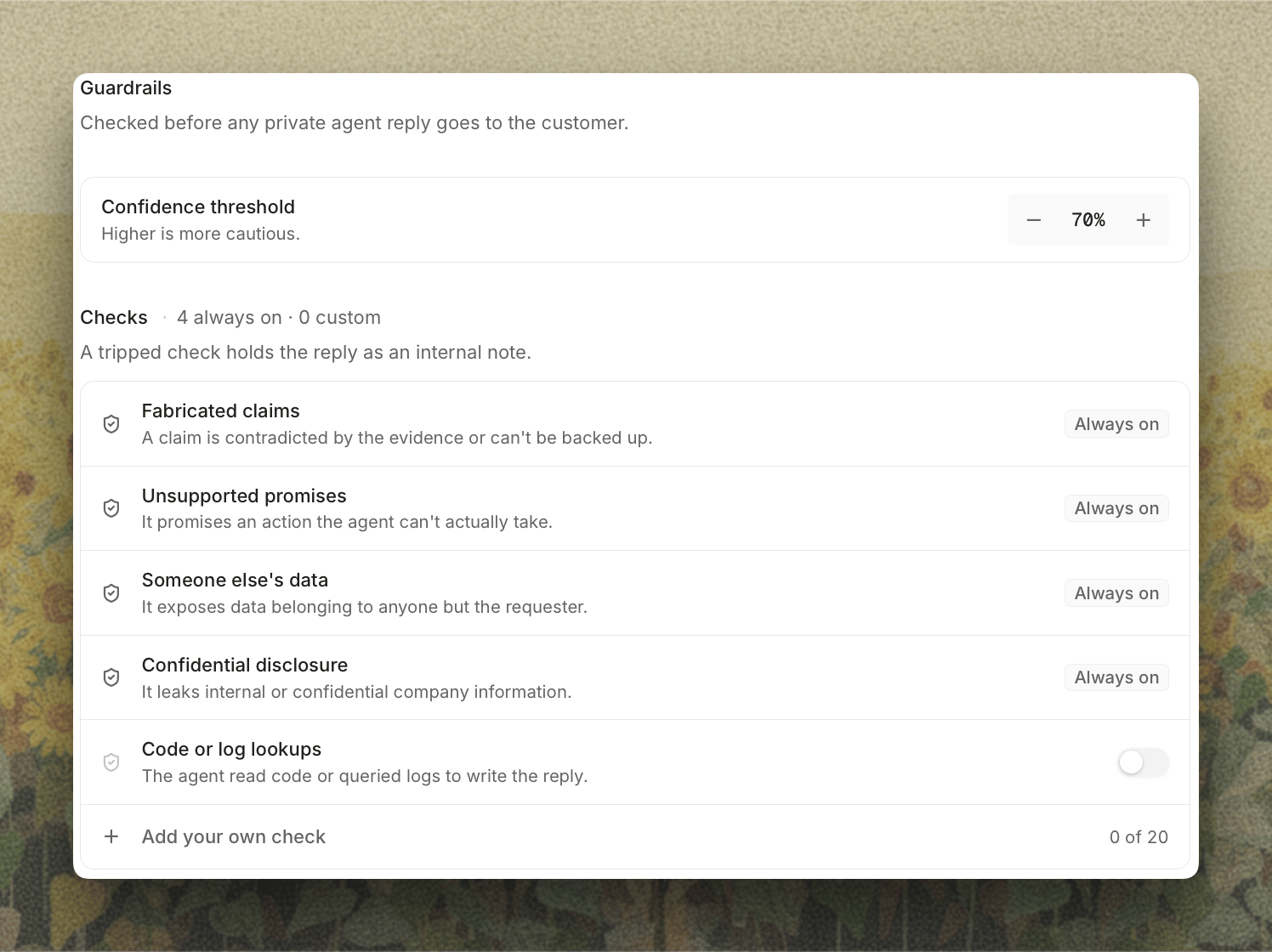
Open Settings, select Support Agent under Agents, then Guardrails. Guardrails apply whenever the private agent acts on its own: when private agent replies are on, or when payments are set to Issue. Until one of those is on, the tab is locked and links you to where to turn them on. A tripped check holds the reply, and any payment action with it, as an internal note for your team. The public agent is checked separately by its own verifier. The Guardrails tab

Confidence Threshold

Beyond the pass/fail checks, the verifier scores how confident it is that a reply is safe and complete. The agent only sends when that confidence is at or above your Confidence threshold, which is 80% by default. Raise it to be more cautious.

Always On

These checks apply to every reply and can’t be turned off:

Code or Log Lookups

Turn on Code or log lookups to hold any reply where the agent read your code or queried your logs to write it. Use it when you’d rather a person review anything that came from internal systems.

Your Checks

Write your own conditions as sentences. Each check has a Name and a Block auto-send when… condition, for example “the reply approves a refund over $500” or “the reply commits to a specific delivery date.” You can add up to 20, and each has its own switch. The verifier also reads any reply instructions on the ticket’s routing category, and holds a reply that ignores them.