Default Ticket View
Pick what you see when you open Support: For you or All. You can switch views on the page any time.For You Filters
These decide which tickets the For you view holds. Out of the box, it’s open tickets assigned to you. Build any filter you’d build on the ticket list: status, assignee, customer, type, tag, agent status, response count. Dates are the exception, since a For you view holds what’s open now rather than a fixed window. Edits save as you make them. Reset to default brings back the original two conditions, and clearing every condition sends you to All tickets instead.Your Reply Signature
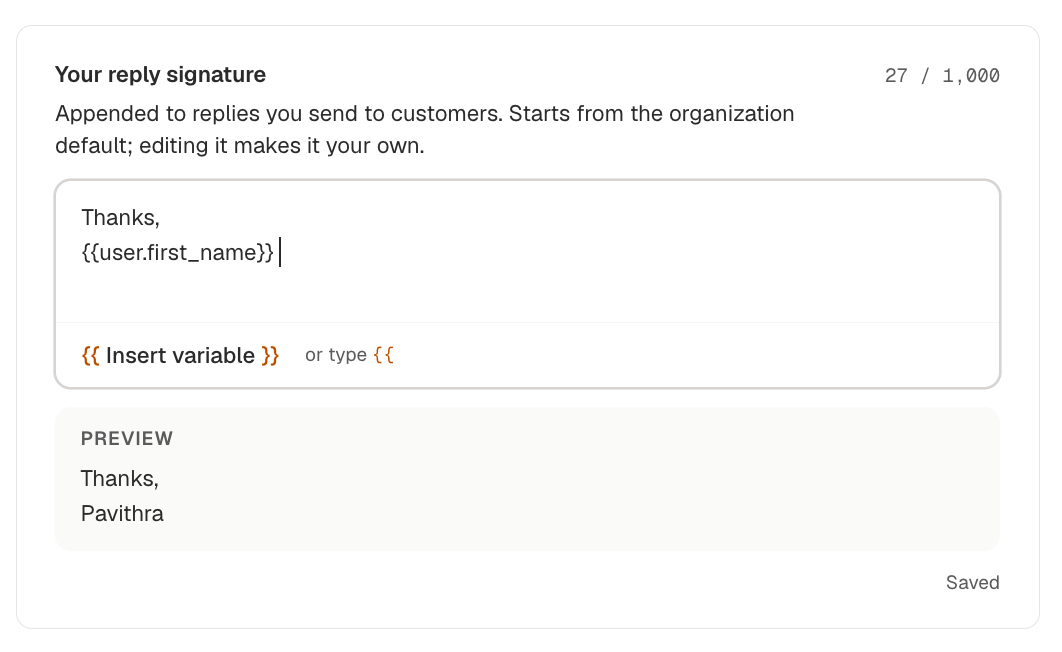
Goes at the end of replies you send to customers. You start on the organization default, which an admin sets under Settings → About. Edit it and it becomes yours, with Reset to organization default to go back. Type{{ where you want a name, or click Insert variable:
The preview below the box fills those in with your own name, so you can read the signature the way your customer will. You get 1,000 characters, counted in the corner, and the box saves on its own.