

Before you connect
You need an admin or member role in the Decimal workspace you want to use. Playground users cannot connect with OAuth. Your AI client’s account and workspace policies must also allow custom MCP connections.OAuth gives both admins and members access to create tickets and approve or reject gaps. For a read-only connection, use a client that supports an API key and ask your Decimal admin for a key with only the read scopes you need.
Use this server URL with the Streamable HTTP transport:
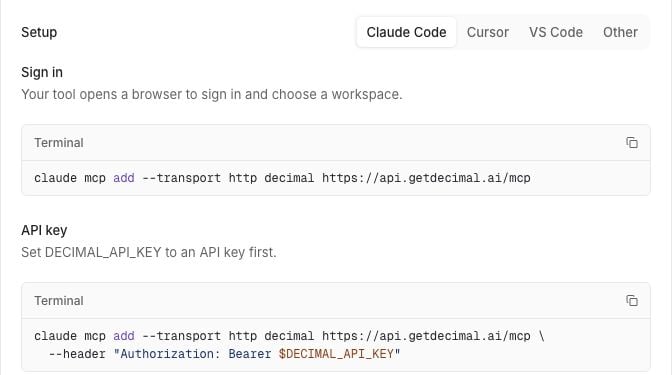
Choose your client
- Claude
- ChatGPT
- Claude Code
- Cursor
- VS Code
- Open Customize → Connectors in Claude, then + Add → Add custom connector.
- Name the connector Decimal and enter
https://api.getdecimal.ai/mcp. - Continue to the authentication settings. Use browser sign-in and Use Claude’s published identity (Recommended) for the OAuth client.
- Finish adding the connector. Sign in to Decimal and choose your workspace when prompted.
- Return to Claude, connect Decimal, and enable it for your conversation.
Limit an API key’s access
Ask a Decimal admin to open Settings → API keys → New API key. Give the key a name that identifies its client and choose only the scopes it needs. The Read only shortcut selects read scopes; review that selection before creating the key. All also includes write and delete permissions for the public API.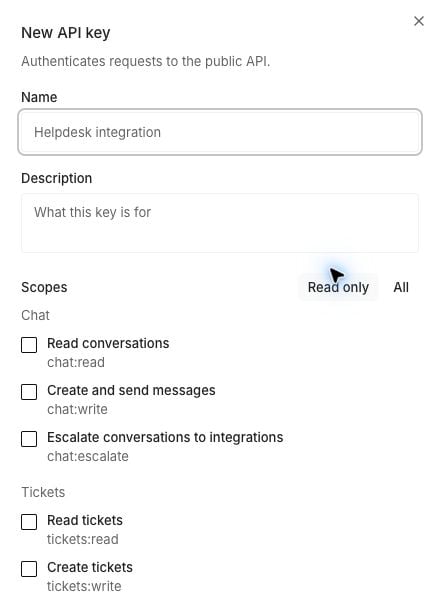
tickets:read and knowledge:read let a client investigate tickets and knowledge without changing them. Add gaps:read to inspect proposed changes or pull_requests:read to inspect pull requests.
Write permissions are separate:
Copy a newly created key into secure storage when Decimal shows it. It is displayed only once. Keep it out of chat messages, screenshots, URLs, and source control.
Check your workspace and tools
Check the workspace selected on the Decimal sign-in screen before authorizing the connection. Then ask:“List the Decimal tools I can use. Don’t retrieve records or change anything.”With OAuth, members can read tickets and files, knowledge articles, gaps, and pull requests. They can also create tickets and approve or reject gaps. Admins additionally have access to API-created conversations, automations and runs, and audit logs. Internal-note creation through
create_ticket_note requires an API key with tickets:notes; current OAuth role grants don’t include that scope.
Decimal checks current workspace membership and role on each OAuth request. Don’t assume an older OAuth connection stays read-only. API keys use their assigned scopes.
Tools also depend on workspace features. A tool can appear in the client and still return forbidden if the feature is unavailable.
Try a read-only question next:
- “Find tickets about a password reset loop. Open the relevant tickets and summarize the replies and internal notes.”
- “Find published knowledge articles about password resets and cite the steps.”
- “Show an in-review knowledge gap and explain its diff without applying it.”
Review changes before running them
Tell your client to show the proposed change and ask for confirmation before calling a write tool. Don’t assume every client will ask automatically.Creating a ticket can lead to email replies to the requester. Approving a knowledge gap can publish a live help-center change. Check the recipient or destination before confirming.
- Create a ticket: Review the requester email, title, and body before confirming
create_ticket. Your workspace needs a connected mailbox; with multiple mailboxes, choose the intended one. - Add an internal note: Review the ticket, originating helpdesk, and Markdown body before confirming
create_ticket_note. The note is sent to the helpdesk and attributed to the API key’s name. The helpdesk must support this action. - Approve a gap: Inspect the diff and destination before confirming
approve_gap. It applies an in-review knowledge change to an internal article or a connected Zendesk or Intercom help center. It doesn’t approve code gaps. - Reject a gap: Confirm the proposed change you want to discard before calling
reject_gap. It rejects an in-review gap; it doesn’t undo an applied change.
Fix a connection problem
If the error says Reconnect and choose a workspace, repeat sign-in and select the workspace. If it says This connection was revoked, email support rather than assuming reconnecting will restore it.