> ## Documentation Index
> Fetch the complete documentation index at: https://docs.decimal.app/llms.txt
> Use this file to discover all available pages before exploring further.
# Full Autonomy
> Let Decimal's AI agent send its own replies to customers, gated by a verifier and the guardrails you set.
Full Autonomy lets Decimal's AI agent reply to customers on its own. Every reply still passes an independent verifier and the guardrails you set before it goes out. The agent only sends when it clears every check. You control how far to take it, from watching what it *would* send to letting it reply live.
## What It Does
* **Sends replies automatically**: posts the agent's drafted reply to the customer when it clears every check, with no one in the loop
* **Checks every reply first**: an independent verifier reviews each reply and holds back anything unsafe before it reaches the customer
* **Runs your guardrails**: enforces conditions you write in plain language, on top of the always-on safety checks
* **Stands down for humans**: if a teammate has already replied on a ticket, the agent won't send
* **Starts in Preview**: drafts replies as internal notes so you can see what it would send before it sends anything for real
Full Autonomy is configured for **Support Agents**. Open **Agents**, select **Support Agent**, and go to the **Replies** tab.
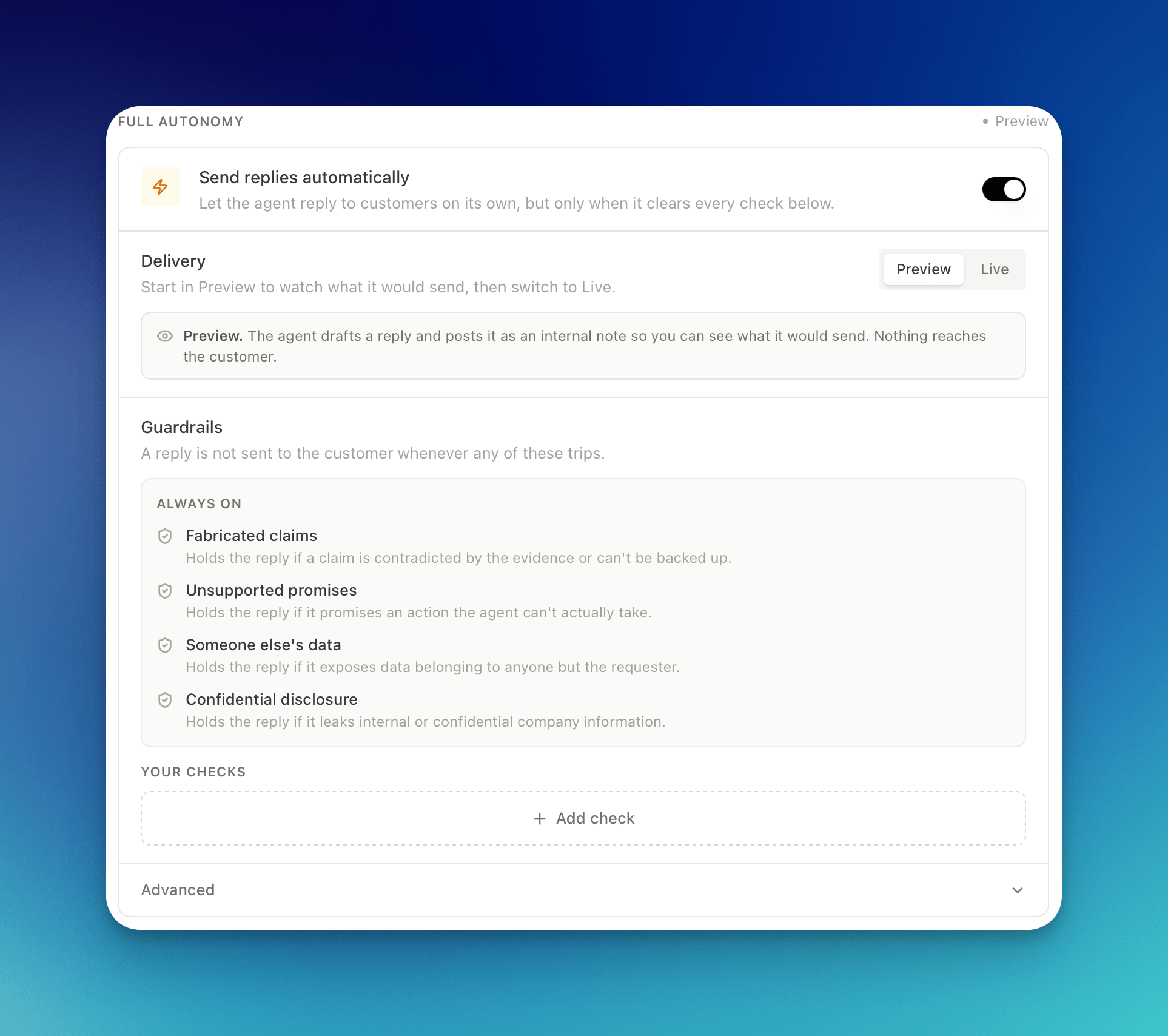 Full Autonomy is enabled per workspace. If you see a **Contact support** button instead of the toggle, email [support@getdecimal.ai](mailto:support@getdecimal.ai?subject=Enable%20Full%20autonomy) to turn it on for your team.
## Preview vs Live
Full Autonomy has two delivery modes. Switch between them with the **Delivery** control.
* **Preview** (default): the agent drafts a reply and posts it as an **internal note** on the ticket, so you can see exactly what it would send. Nothing reaches the customer.
* **Live**: the agent **sends its own replies to customers** whenever every check passes. You won't review them first.
Full Autonomy is enabled per workspace. If you see a **Contact support** button instead of the toggle, email [support@getdecimal.ai](mailto:support@getdecimal.ai?subject=Enable%20Full%20autonomy) to turn it on for your team.
## Preview vs Live
Full Autonomy has two delivery modes. Switch between them with the **Delivery** control.
* **Preview** (default): the agent drafts a reply and posts it as an **internal note** on the ticket, so you can see exactly what it would send. Nothing reaches the customer.
* **Live**: the agent **sends its own replies to customers** whenever every check passes. You won't review them first.
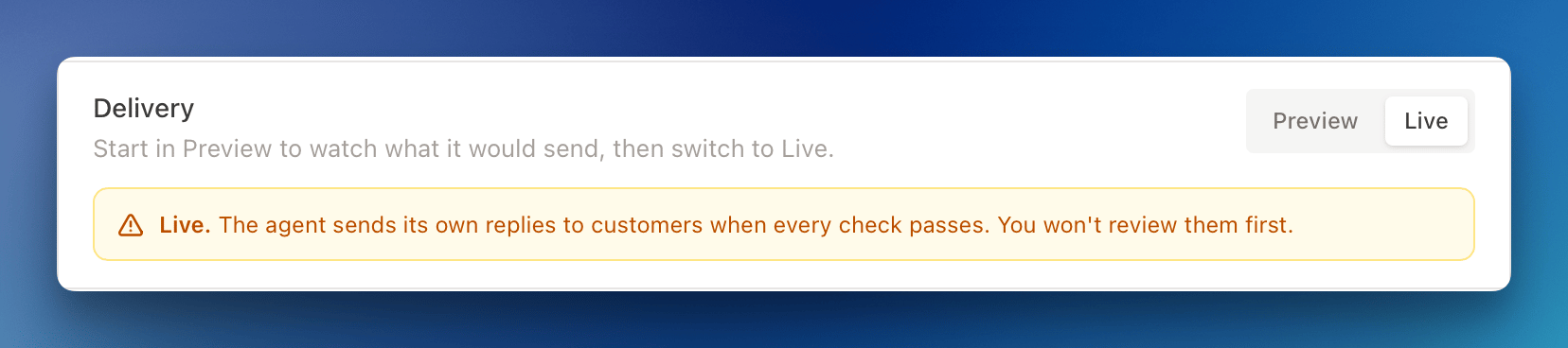 Start in **Preview**. Let the agent draft against real tickets for a while and read what it would have sent. Once the drafts look right, switch **Delivery** to **Live**.
## Guardrails
A reply is **never sent to the customer** if any guardrail trips.
### Always on
These safety checks apply to every reply and can't be turned off:
| Check | What it holds back |
| --------------------------- | ----------------------------------------------------------------- |
| **Fabricated claims** | A claim that's contradicted by the evidence or can't be backed up |
| **Unsupported promises** | A promise to take an action the agent can't actually take |
| **Someone else's data** | Anything that exposes data belonging to anyone but the requester |
| **Confidential disclosure** | Internal or confidential company information |
### Your checks
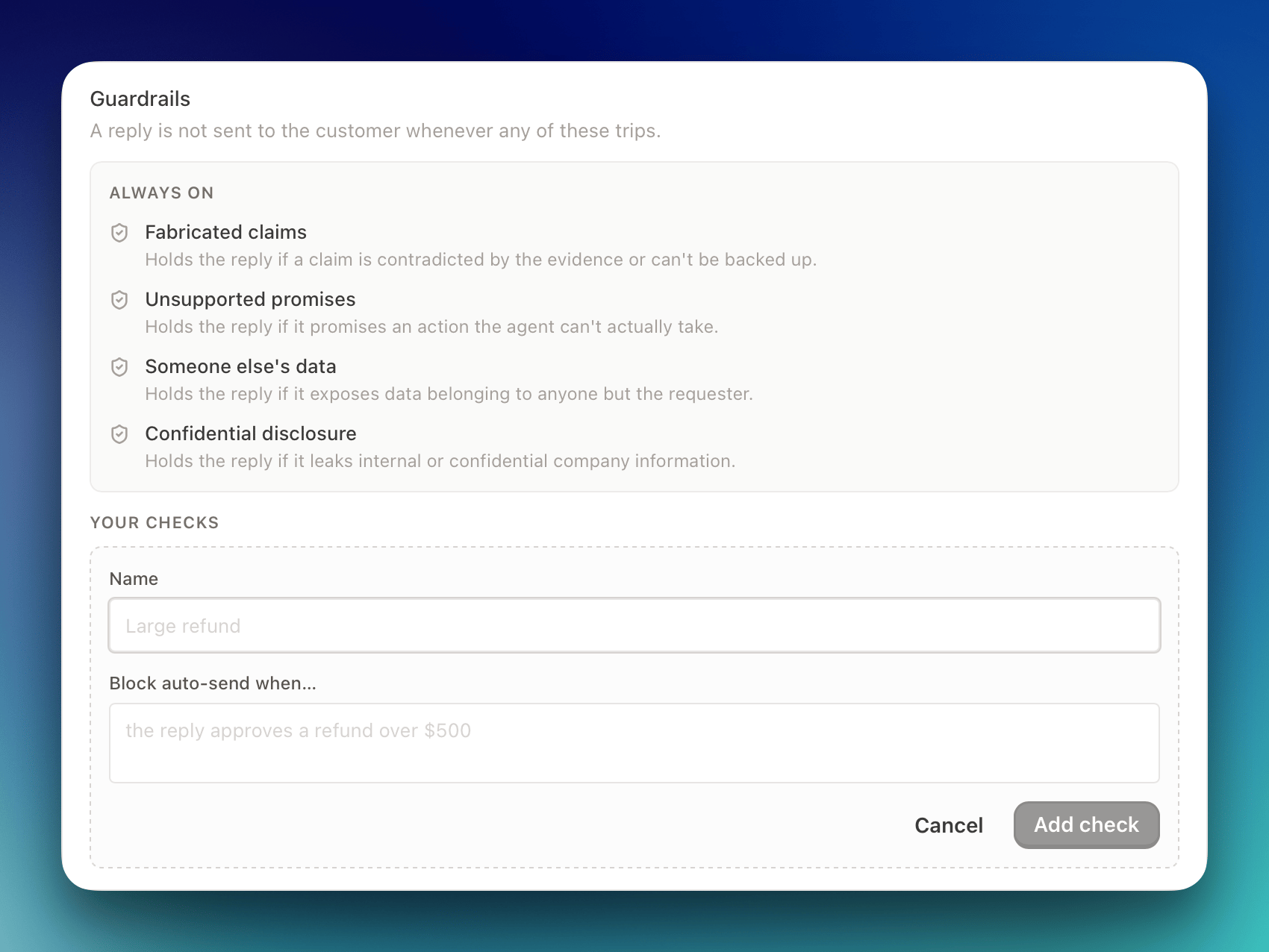
Add your own conditions in plain language. For example, *"the reply approves a refund over \$500"* or *"the reply commits to a specific delivery date."* Each check has a **name** and a **Block auto-send when…** condition. You can add up to 20.
Start in **Preview**. Let the agent draft against real tickets for a while and read what it would have sent. Once the drafts look right, switch **Delivery** to **Live**.
## Guardrails
A reply is **never sent to the customer** if any guardrail trips.
### Always on
These safety checks apply to every reply and can't be turned off:
| Check | What it holds back |
| --------------------------- | ----------------------------------------------------------------- |
| **Fabricated claims** | A claim that's contradicted by the evidence or can't be backed up |
| **Unsupported promises** | A promise to take an action the agent can't actually take |
| **Someone else's data** | Anything that exposes data belonging to anyone but the requester |
| **Confidential disclosure** | Internal or confidential company information |
### Your checks
Add your own conditions in plain language. For example, *"the reply approves a refund over \$500"* or *"the reply commits to a specific delivery date."* Each check has a **name** and a **Block auto-send when…** condition. You can add up to 20.
 ### Confidence threshold
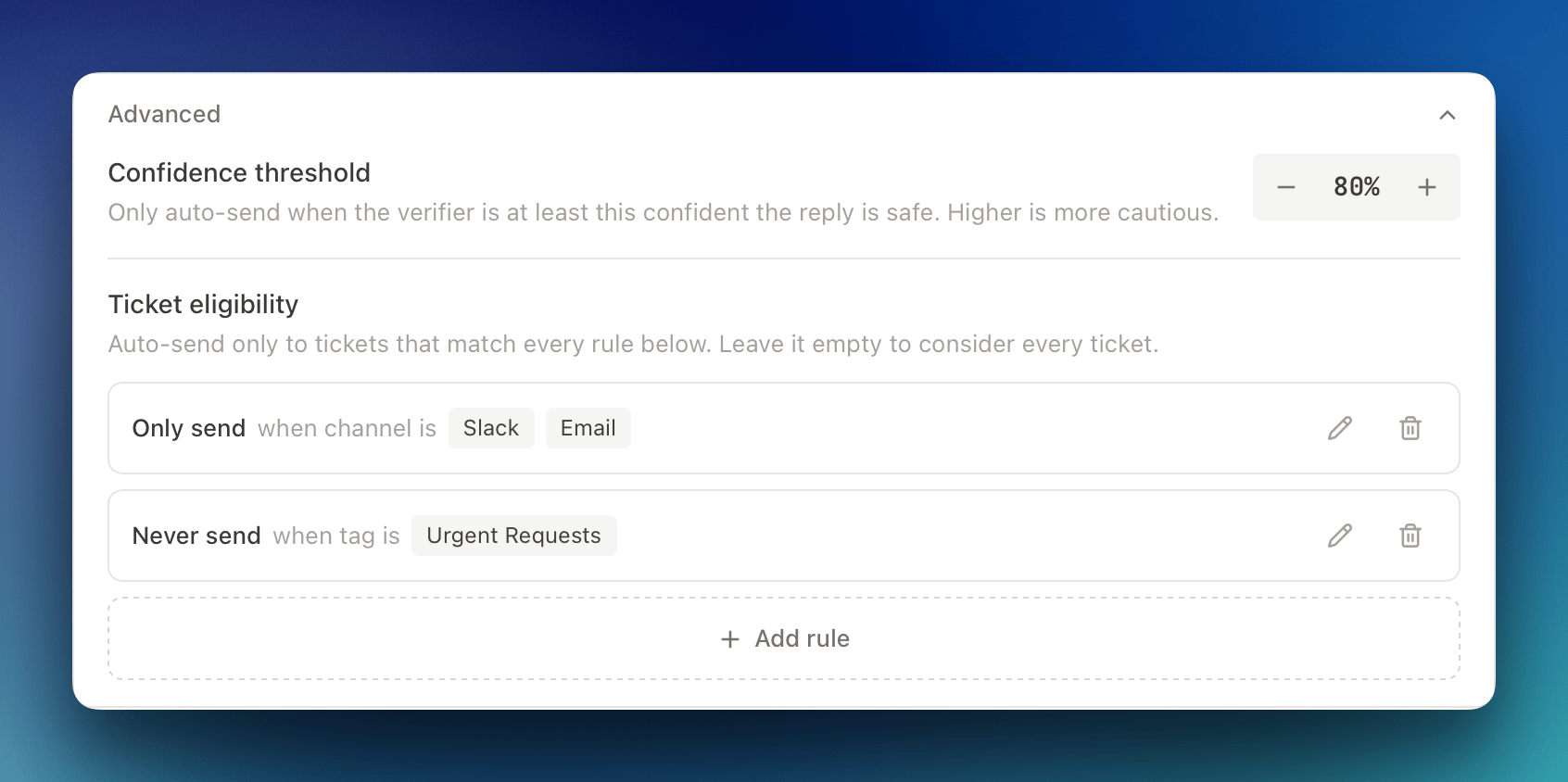
Beyond the pass/fail guardrails, the verifier scores how confident it is that a reply is safe and complete. Full Autonomy only sends when that confidence is at or above your **confidence threshold**, which is **80%** by default. Raise it to be more cautious. You'll find it under **Advanced**.
## Ticket eligibility
By default, every ticket is eligible for auto-send. Under **Advanced**, you can narrow that with **Only send** and **Never send** rules by **channel** or **tag**. For instance, only auto-send tickets from a specific channel, or never auto-send anything tagged `vip`. Leave it empty to consider every ticket.
### Confidence threshold
Beyond the pass/fail guardrails, the verifier scores how confident it is that a reply is safe and complete. Full Autonomy only sends when that confidence is at or above your **confidence threshold**, which is **80%** by default. Raise it to be more cautious. You'll find it under **Advanced**.
## Ticket eligibility
By default, every ticket is eligible for auto-send. Under **Advanced**, you can narrow that with **Only send** and **Never send** rules by **channel** or **tag**. For instance, only auto-send tickets from a specific channel, or never auto-send anything tagged `vip`. Leave it empty to consider every ticket.
 ## Turning on Full Autonomy
1. **Open the Replies tab**: Go to **Agents**, select **Support Agent**, and open the **Replies** tab.
2. **Turn on Send replies automatically**: Full Autonomy starts in **Preview**, so the agent drafts replies but sends nothing to customers.
3. **Review your guardrails**: Check the always-on list and add any of **your checks** for your team's policies.
4. **Set your thresholds (optional)**: Under **Advanced**, adjust the confidence threshold and add ticket-eligibility rules.
5. **Watch Preview on real tickets**: Read the internal-note drafts the agent posts and confirm they're what you'd send.
6. **Switch to Live**: When you're confident, set **Delivery** to **Live** and the agent begins sending its own replies.
Full Autonomy needs a standalone customer reply, so while it's on, **Drafted reply** stays enabled under **Reply content** and any notes post separately.
## When a reply is held back
If any guardrail trips or the verifier's confidence is below your threshold, the reply is **not sent to the customer**. The agent's draft is posted as an internal note instead, so your team can review it and take the ticket from there, the same as any ticket the agent never autonomously acted on.
The agent also stands down when a teammate has already replied on the ticket. It won't send over a human.
## Turning on Full Autonomy
1. **Open the Replies tab**: Go to **Agents**, select **Support Agent**, and open the **Replies** tab.
2. **Turn on Send replies automatically**: Full Autonomy starts in **Preview**, so the agent drafts replies but sends nothing to customers.
3. **Review your guardrails**: Check the always-on list and add any of **your checks** for your team's policies.
4. **Set your thresholds (optional)**: Under **Advanced**, adjust the confidence threshold and add ticket-eligibility rules.
5. **Watch Preview on real tickets**: Read the internal-note drafts the agent posts and confirm they're what you'd send.
6. **Switch to Live**: When you're confident, set **Delivery** to **Live** and the agent begins sending its own replies.
Full Autonomy needs a standalone customer reply, so while it's on, **Drafted reply** stays enabled under **Reply content** and any notes post separately.
## When a reply is held back
If any guardrail trips or the verifier's confidence is below your threshold, the reply is **not sent to the customer**. The agent's draft is posted as an internal note instead, so your team can review it and take the ticket from there, the same as any ticket the agent never autonomously acted on.
The agent also stands down when a teammate has already replied on the ticket. It won't send over a human.