> ## Documentation Index
> Fetch the complete documentation index at: https://docs.decimal.app/llms.txt
> Use this file to discover all available pages before exploring further.
# Support Agent Settings
> Decide which tickets the Support Agent answers, how many times it can reply, and what it may do without a human.
Open **Agents**, select **Support Agent**, then **Settings**. The [Slack agent](/agents/slack) has its own settings, unrelated to these.
## Skip Rules
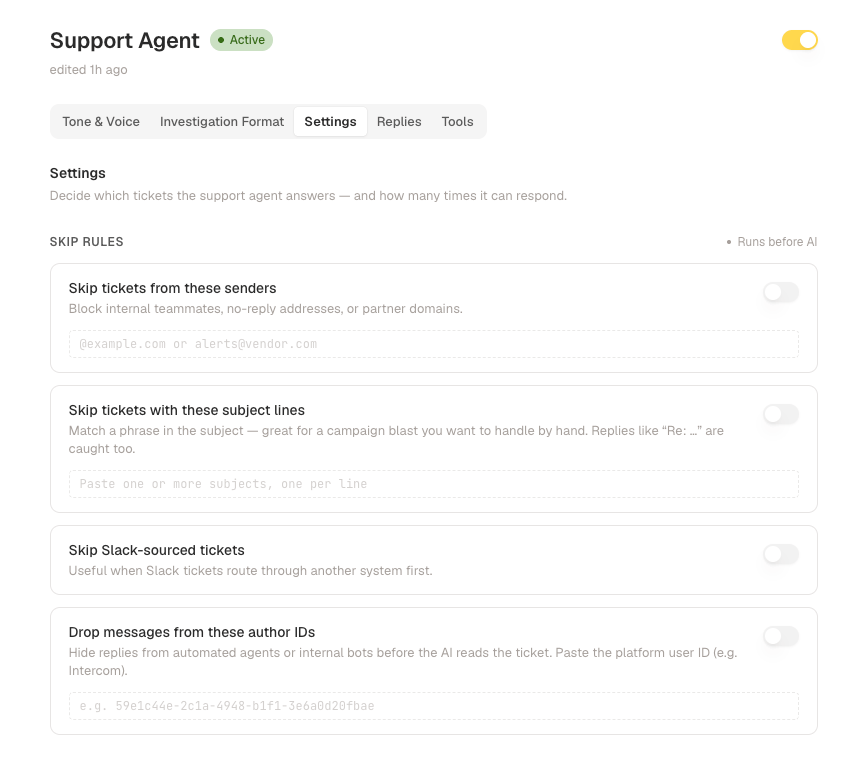
Skip rules run before the agent does, so a skipped ticket costs nothing and never gets a draft. Each rule has its own switch, so you can keep a list without applying it.
* **Skip tickets from these senders**: an address or a whole domain. Enter `@acme.com` for everything from that domain, or a full address for one person. Use it for internal teammates, no-reply addresses, and vendors.
* **Skip tickets with these subject lines**: matches a phrase anywhere in the subject, one phrase per line. Replies that come back as "Re: ..." are caught too, so a campaign blast you want to handle by hand stays out.
* **Skip Slack-sourced tickets**: useful when your Slack tickets route through another system first and you'd rather the agent answered them there.
* **Drop messages from these author IDs**: hides individual messages, not whole tickets, before the agent reads them. Paste the platform's user ID for an automated agent or internal bot.
 ## Response Limits
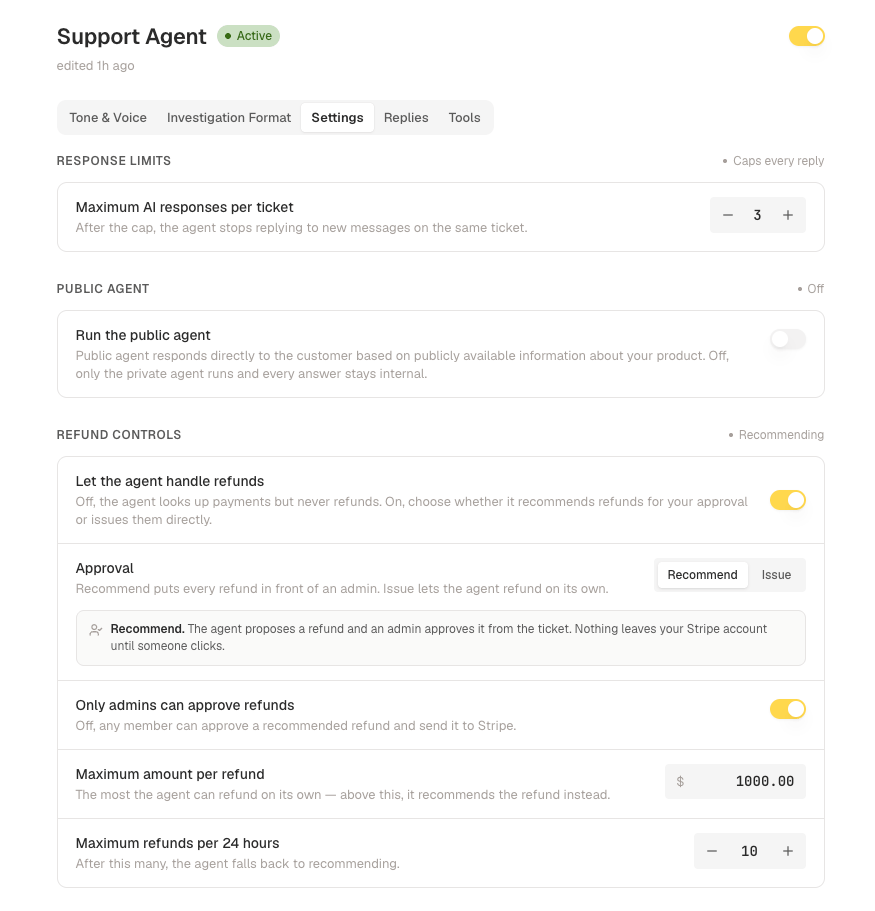
**Maximum AI responses per ticket** is three by default. Once the agent hits the cap it stops replying to new messages on that ticket, which is what breaks the loop when a customer's automated mailer answers every reply.
## Public Agent
**Run the public agent** lets a second agent answer the customer directly using only publicly available information about your product. Left off, only the private agent runs and every answer stays internal for your team to send.
## Auto Acknowledgement
If your workspace has it, the agent posts an immediate holding reply while it investigates, so the customer knows the ticket landed. The message is yours to edit.
## Refund Controls
These appear only when [Stripe](/integrations/stripe) is connected.
**Let the agent handle refunds** is the master switch. Off, the agent can still look payments up but never refunds. On, you choose how far it goes:
* **Approval**: **Recommend** has the agent propose a refund for an admin to approve from the ticket, so nothing leaves your Stripe account until someone clicks. **Issue** lets it refund on its own.
* **Only admins can approve refunds**: off, any member can approve a recommended refund and send it to Stripe.
* **Maximum amount per refund**: above this the agent recommends instead of issuing, even in **Issue** mode.
* **Maximum refunds per 24 hours**: after this many, it falls back to recommending.
## Response Limits
**Maximum AI responses per ticket** is three by default. Once the agent hits the cap it stops replying to new messages on that ticket, which is what breaks the loop when a customer's automated mailer answers every reply.
## Public Agent
**Run the public agent** lets a second agent answer the customer directly using only publicly available information about your product. Left off, only the private agent runs and every answer stays internal for your team to send.
## Auto Acknowledgement
If your workspace has it, the agent posts an immediate holding reply while it investigates, so the customer knows the ticket landed. The message is yours to edit.
## Refund Controls
These appear only when [Stripe](/integrations/stripe) is connected.
**Let the agent handle refunds** is the master switch. Off, the agent can still look payments up but never refunds. On, you choose how far it goes:
* **Approval**: **Recommend** has the agent propose a refund for an admin to approve from the ticket, so nothing leaves your Stripe account until someone clicks. **Issue** lets it refund on its own.
* **Only admins can approve refunds**: off, any member can approve a recommended refund and send it to Stripe.
* **Maximum amount per refund**: above this the agent recommends instead of issuing, even in **Issue** mode.
* **Maximum refunds per 24 hours**: after this many, it falls back to recommending.